
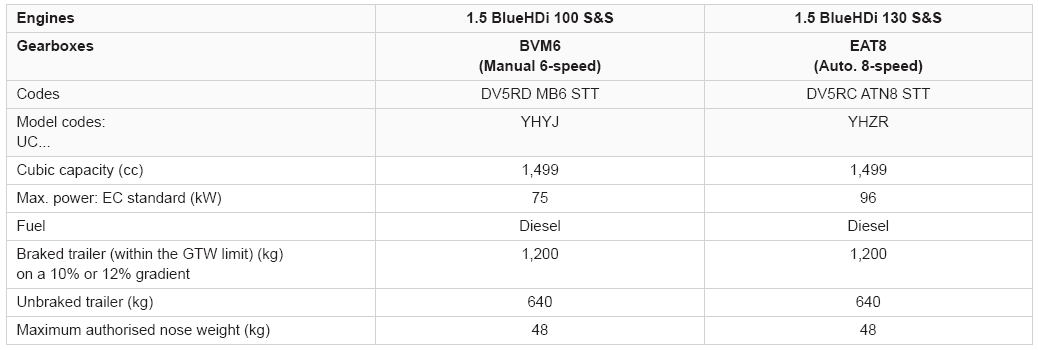
Peugeot 2008: Technical data / Diesel engines
Peugeot 2008 2019-2026 Owner's Manual / Technical data / Diesel engines


Other information:
Peugeot 2008 2019-2026 Owner's Manual: Deactivating the front passenger airbag
Passenger airbag OFF For your child’s safety, the front passenger airbag MUST be deactivated when a "rearward facing" child seat is installed on the front passenger seat. Otherwise, the child would be exposed to the risk of death or serious injury in the event of airbag deployment. Vehicles not equipped with a deactivation/reactivation control Installing a "rearward facing" child se..
Peugeot 2008 2019-2026 Owner's Manual: Red warning/indicator lamps
STOP Fixed, associated with another warning lamp, accompanied by the display of a message and an audible signal. A serious fault with the engine, braking system, power steering, automatic gearbox or a major electrical fault has been detected. Carry out (1) and then (2). Engine self-diagnostics system (Petrol or Diesel) Fixed. A major engine fault has been detected. Carry out (1) and then (2). Ma..
Categories
- Manuals Home
- 2nd Generation Peugeot 2008 Owners Manual
- 2nd Generation Peugeot 2008 Service Manual
- Driving modes
- Proximity Keyless Entry and Start
- Refuelling
- New on site
- Most important about car

Copyright © 2026 www.pe2008.net