
Peugeot 2008: Technical data / Dimensions
Peugeot 2008 2019-2026 Owner's Manual / Technical data / Dimensions
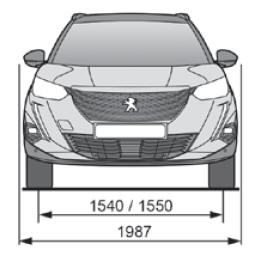
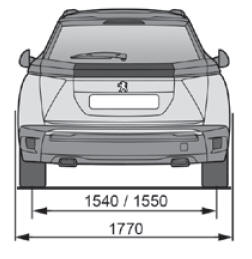
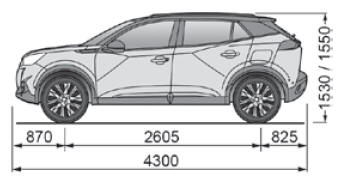
These dimensions have been measured on an unladen vehicle.

 Identification markings
Various visible markings for the identification and research of your vehicle.
Vehicle identification number (VIN), under the bonnet.Stamped
on the chassis...
Other information:
Peugeot 2008 2019-2026 Owner's Manual: Doors
Opening From outside After unlocking the vehicle or with the Keyless Entry and Starting electronic key in the recognition zone, pull the door handle. From inside Pull the interior opening control of a door; this unlocks the vehicle completely...
Peugeot 2008 2019-2026 Owner's Manual: Misfuel prevention (Diesel)
(Depending on country of sale.) This mechanical device prevents filling the tank of a Diesel vehicle with petrol. Located in the filler neck, the misfuel prevention device appears when the filler cap is removed. Operation When a petrol filler nozzle is inserted into the fuel filler neck of a Diesel vehicle, it comes into contact with the flap...
Categories
- Manuals Home
- 2nd Generation Peugeot 2008 Owners Manual
- 2nd Generation Peugeot 2008 Service Manual
- Alarm
- Automatic gearbox (EAT8)
- Manual child lock
- New on site
- Most important about car

Copyright © 2026 www.pe2008.net