
Peugeot 2008: Overview / Electric motor
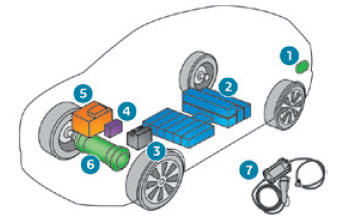
- Charging connectors
- Traction battery
- Accessory battery
- Heat pump
- On-board charger
- Electric motor
- Charging cable with integrated control unit
The charging connectors 1 enable 3 types of charging:
- Domestic charging, via a mains power socket and the supplied cable 7.
- Accelerated charging, using a Wallbox accelerated charging unit and the corresponding cable.
- Fast charging, using a fast public charger and the corresponding cable.
The 400 V traction battery 2 uses Lithium-Ion technology. It stores and subsequently supplies electric energy to power the electric motor, heating and air conditioning systems. Its charge level is represented by bars on a gauge, and there is a reserve power warning lamp on the instrument panel.
The 12 V accessory battery 3 powers the vehicle’s conventional electrical system. It is used to start the electric motor. This battery is automatically recharged by the traction battery.
The heat pump 4 provides passenger compartment heating and regulates traction battery and on-board charger cooling.
The on-board charger 5 manages traction battery domestic and accelerated charging.
The electric motor 6 provides motive power, based on the selected driving mode and the driving conditions. It recovers energy during vehicle braking and deceleration phases.
 Instruments and controls
These illustrations and descriptions are intended as a guide. The presence
and location of certain elements may vary, depending on the version or trim
level...
 Eco-driving
 refers to a range of everyday practices that allow the motorist
to optimise their energy consumption (fuel and/or electricity) and CO2
emissions...
Other information:
Peugeot 2008 2019-2026 Owner's Manual: Matrix instrument panel
Dials Coolant temperature indicator (°C) (Petrol or Diesel)Thermal comfort consumption indicator (Electric) Analogue speedometer (mph or km/h) Matrix display Rev counter (x 1000 rpm), graduation depends on the engine (Petrol or Diesel)Power indicator (Electric) Fuel gauge (Petrol or Diesel)Charge level indicator (Electric) Matrix display Cruise control / speed limiter settingsDispl..
Peugeot 2008 2019-2026 Owner's Manual: Settings
Configuring profiles Press Settings to display the main page. Press "Profiles". Select "Profile 1", "Profile 2", "Profile 3” or "Common profile". Press this button to enter a name for the profile using the virtual keypad. Press "OK" to save. Press the back arrow to confirm. Press this button to activate the profile. Press the back arrow again to confirm. Press this button to reset t..
Categories
- Manuals Home
- 2nd Generation Peugeot 2008 Owners Manual
- 2nd Generation Peugeot 2008 Service Manual
- Cruise control
- Active Safety Brake with Distance Alert and Intelligent emergency braking assistance
- Trip computer
- New on site
- Most important about car
