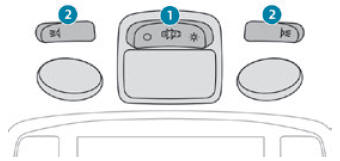
Peugeot 2008: Lighting and visibility / Guide-me-home and welcome lighting
Guide-me-home lighting
Automatic
With the ring in the "AUTO" position, when the light is poor, the dipped beam headlamps come on automatically when the ignition is switched off.
 You can activate/deactivate this
function and adjust the guide-me-home lighting duration in the Driving /
Vehicle touch screen menu.
You can activate/deactivate this
function and adjust the guide-me-home lighting duration in the Driving /
Vehicle touch screen menu.
Manual
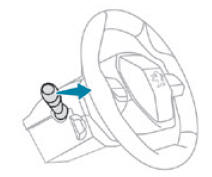
- With the ignition off, pull the lighting control stalk toward you ("headlamp flash") to activate/deactivate the function.
Manual guide-me-home lighting goes off automatically after a period of time.
Welcome lighting
When the vehicle is unlocked, if the ambient light is low and the "Automatic illumination of headlamps" function is activated, this system automatically turns on certain exterior lamps as well as certain lamps in the passenger compartment.
 You can activate/deactivate this
function and adjust the welcome lighting duration in the Driving / Vehicle
touch screen menu.
You can activate/deactivate this
function and adjust the welcome lighting duration in the Driving / Vehicle
touch screen menu.
Door mirror spotlamps
These spotlamps facilitate access to the vehicle by lighting the ground near the front doors.
The spotlamps come on automatically:
- when the vehicle is unlocked.
- when a door is opened.
- when a request to locate the vehicle is received from the remote control.
They also come on with the welcome lighting and guide-me-home lighting functions.
They go off automatically after 30 seconds.
 Automatic illumination of headlamps
When the ring is at the "AUTO" position and a low level of ambient light is
detected by the rain/sunshine sensor, the number plate lamps, sidelamps and
dipped beam headlamps are switched on automatically, without any action on the
part of the driver...
 Automatic headlamp dipping
When the ring is in the "AUTO” position, this system automatically
switches between dipped and main beam headlamps according to the lighting and
traffic conditions, using a camera located at the top of the windscreen...
Other information:
Peugeot 2008 2019-2026 Owner's Manual: Eco-driving
Eco-driving refers to a range of everyday practices that allow the motorist to optimise their energy consumption (fuel and/or electricity) and CO2 emissions. Optimise your use of the gearbox With a manual gearbox, move off gently and change up promptly...
Peugeot 2008 2019-2026 Owner's Manual: First steps
With the engine running, a press mutes the sound. With the ignition off, a press turns the system on. Increase or decrease the volume using the wheel or the "plus" or "minus" buttons (depending on the equipment). Use the buttons on either side of or below the touch screen to access the menus, then press the virtual buttons on the touch screen...
Categories
- Manuals Home
- 2nd Generation Peugeot 2008 Owners Manual
- 2nd Generation Peugeot 2008 Service Manual
- Refuelling
- Stop & Start
- Alarm
- New on site
- Most important about car
Courtesy lamps. Interior ambience lighting
Courtesy lamps
Non touch-sensitive version